GUIDE / AI INTEGRATION
How to integrate AI with legacy systems
Start with one workflow and the interfaces your existing systems actually expose. Identify the data the model needs, the actions the application permits, and the person responsible when the result needs review. Those decisions turn a model connection into a usable integration.
4 min read
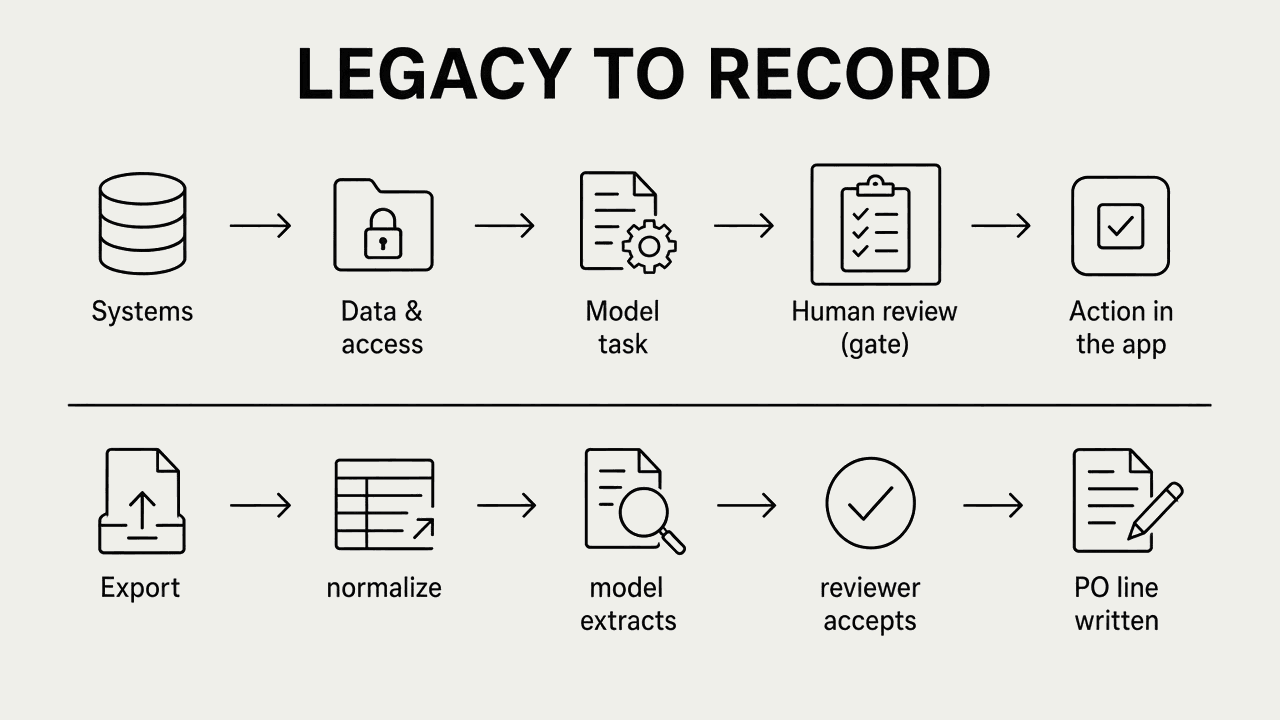
A legacy application may remain central to the operation even when it lacks a modern interface. Connecting AI does not remove that dependency. It makes understanding the application's access rules and behavior more important.
Write down one operational task
“Add AI to our systems” leaves too many decisions open. A more useful brief names a user, an input, and an outcome.
For example, an internal support team could use a model to summarize a case history before a reviewer updates the case. This is an illustrative workflow, not a Lavinium client deployment. It creates specific questions: which case records can the user see, how current must the history be, and who approves the update?
Describe the current manual steps before choosing the model. If the task is simply moving a known field between two systems, ordinary integration logic may be sufficient.
Inventory the available interfaces
List each source and destination, its owner, and the permitted connection method. Record whether the interface supports reading, writing, or both.
An approved API may offer the necessary operations. A scheduled export may be adequate for a workflow that tolerates delay. Database access requires agreement on permissions and the supported approach; a technically possible write is not necessarily a supported integration.
Ask the operating team what must keep working during deployment. Note constraints such as maintenance windows, rate limits, missing identifiers, and vendor-managed changes. These are inputs to the scope.
Translate data deliberately
Different applications can use the same word for different things. A “customer,” “case,” or “status” may have different identifiers and allowed values in each system.
A translation layer can keep those differences outside the AI task. Microsoft's anti-corruption layer pattern describes a boundary that translates between systems with different models. Whether that layer is justified depends on the complexity and maintenance cost of the integration. Microsoft architecture guidance ↗
For the case-summary example, decide which source owns the case status and how the summary links back to that record. Include source timestamps so a reviewer can recognize outdated information.
Separate a proposed answer from an authorized action
A model can prepare text without receiving permission to update every record it can describe. Enforce access in the application and data services, using the identity and scope appropriate to the user and task.
Before accepting an update, validate the destination, required fields, and permitted transition. Where review is required, present the original information and the proposed change together. The reviewer should be able to edit, reject, or escalate it.
A prompt can describe an intended boundary. The application must enforce the boundary.
Decide what happens when a connection fails
Consider both unavailable connections and ambiguous results. If a request times out, the destination may still have processed it. Repeating a write without checking can create a duplicate.
Microsoft's retry guidance distinguishes transient failures and stresses whether an operation is safe to repeat. Use the destination's supported deduplication or status-check mechanism where available, and define how unresolved attempts reach an operator. Microsoft retry pattern ↗
The operating team needs to see which step failed and what is safe to do next. A generic error message is rarely enough to reconcile a partially completed workflow.
Agree on evidence before rollout
Build a small evaluation set around the intended task. Include routine inputs, missing information, outdated records, and cases that should be refused or routed for review. Review the outputs with the people who understand the work.
Test the surrounding integration as well: access restrictions, invalid data, duplicate requests, and unavailable dependencies. A useful summary is only one part of a successful workflow.
A limited rollout can help establish whether the result is usable under real operating conditions. Define who can stop the workflow, the manual fallback, and the evidence required before expanding it.
Bring these questions to the first scoping conversation
- Which workflow should improve, and who owns it?
- Which systems hold the required information?
- What interfaces and permissions are available?
- How fresh must the data be?
- Which actions require a person's approval?
- How will failures be identified and reconciled?
- Who will operate and maintain the integration?
These answers help determine whether the next step is data preparation, interface work, evaluation, or implementation.
Common questions
Can AI work with a legacy system that has no API?
Often, yes. A scheduled export, a database view or a file drop can be enough when the workflow tolerates some delay. Database writes need the system owner’s agreement on permissions and the supported method; a write that is technically possible is not always a supported integration.
Do we need to replace the legacy application first?
No, not by default. Start with one workflow and the interfaces the application already exposes. Replacing it is a separate decision about cost and risk, not a precondition for connecting AI.
Should the model write directly to our system of record?
Not without controls. The model proposes; the application decides. Enforce permissions in the application and data services, validate the destination and required fields, and put a person at the steps where a wrong write would matter.
What happens when a connection fails halfway through a write?
Check before you retry. A request that timed out may still have been processed, so repeating it can create a duplicate. Use the destination’s status check or deduplication where it exists, and route unresolved attempts to a named operator.
What should we prepare before a first scoping conversation?
One workflow and its owner, the systems that hold the data, the interfaces and permissions available, how fresh the data must be, which actions need a person’s approval, and who will run the integration afterwards.
DISCUSS YOUR INTEGRATION
Bring us the workflow and the systems around it.
Name the workflow, the systems that hold the data and the step that still happens by hand. We work alongside your team to connect them and put AI where it fits, and your team owns the result.